


Not UK? Change country





Registered in England No. 5191718


Benefit Management
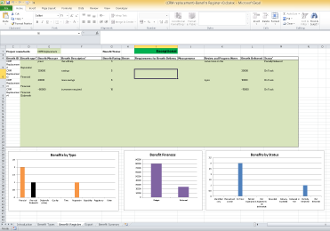
Benefits are currently managed in a spreadsheet benefits Register.xlsx which you can find in the Benefits Management document on projects built from methods which provide this.
Simply check the Benefits register out and work on it using excel, once you are finished check it back in to make the updates available for reporting.
With the file checked out first look at the Information worksheet to see if any organisation specific guidance has been provided. Then go to the Benefit Register worksheet where new benefits can be added and others updated in the green area.
Documenting your Benefit
A Benefit ID will be created automatically once sufficient data is completed.
Select the benefit type from the available picklist and then enter an appropriate measure, f the benefit is financial this should be a value.
Next provide a description and rate the benefit in its importance to the project (10 high, 1 low).
Next list any requirements that need to be in place for delivery of this benefit and details on how the benefit will be measured.
This entry of Benefit information can be done in stages if required and should then be finished with a setting of the Status in the final column.
Once a Benefit is being actively worked on the Review and progress and Benefit Delivered columns can be used to document the progress made. Note that if the Benefit is a financial one then Benefit Delivered should be a value. Status should also be updated during this process.
Benefit Analysis
Charts are produced and statistics calculated as you enter or update your register both on the Benefits Register worksheet and those following it.
Once the register is checked back into the project the date will be loaded out into the properties database and reporting data held for that project and then it will be available for use in Dashboards, reports and other analysis at the project and portfolio levels.
Personalisation
Basic personalisation of the Benefit register is built in, the Benefit Types worksheet is unlocked and allows users to edit the Benefit types and Status used in the register. Usually an organisation decided which ones they wish to use and locks this down with password protection to ensure consistency of data collection across their projects.


The perfect companion planning tool simple to layout, schedule your projects and even resource them. Then share the files with anyone you want. Easy to pick up and use even if you haven’t used MS Project before...if you have..well it’s like MS Project made easy.


Simple Plan Features
It does the following for free!
- Transfer your plan from MSProject
- Transfer your plan to MSProject
- Task name and further details
- Unique duration setting by fixed dates, start plus days or predecessor plus dates
- Add resources and allocation %
- Creates project resource list
- % complete by task
- Group tasks into summaries
- Auto calc summary dates and %
- Task budget and cost control
- Task colours, comments and tags
- Move and copy tasks
- View interactive Gantt
- Click to edit and custom order tasks
- Alter display time frame
- Gantt as image in one click
- Save your plan and share for free
- Bundled with Community Edition
- Upload into PROJECT in a box to integrated into organisation wide resource and task management
- Risk logging, management, analysis and communications
- Issue logging, management, analysis and communications
- Import or export risks via Excel
- Completely FREE!
Or view full PIAB product matrix

‘This basic scheduling and risk management package provides all of the functionality that many users require. And its free!’
Steve Cotterell, Project Manager Today
Read the full review here: PMT July 2012